
Overview
Completeness Checks (formerly Validation Checklists)
Completeness Checks allow you to automatically evaluate whether the information submitted in a case meets a predefined set of rules that reflect your internal policies, regulatory requirements, or operational processes.
Completeness Checks act as a first-pass policy and documentation gate for workflows such as:
- Income and Affordability assessments
- Mortgage underwriting
- Car financing
- Consumer lending
- Income verification
- KYC/KYB
By automating these checks, you ensure every application is complete, consistent, and ready for manual assessment or automated decisioning.
How Completeness Checks Work
A Completeness Check is made up of one or more rules.
Each rule evaluates a specific condition, such as:
- The bank statement issue date within the last 3 months
- Monthly-paid applicant: Must provide 3 payslips (covering 3 months)
- Weekly-paid applicant: Must provide 12 payslips (covering 12 weeks ≈ 3 months)
- Most recent payslip has been provided
Each rule returns a status:
Pass– The rule was satisfiedRefer– The rule could not be verified or needs manual reviewFail– The rule was not satisfied
The overall Completeness Check returns:
Complete– All rules have been evaluated and passed successfully.Pending– The completeness check is still running and has not finished evaluating all rules.Failed– At least one rule did not meet the required condition and returned a Fail status.
This gives lenders and risk teams full transparency into what is missing or inconsistent in the application.
Why Use Completeness Checks?
✔ Enforce your internal policies
Checks allow you to encode your internal rules (e.g., document requirements, recency, consistency) directly into the Sikoia workflow.
✔ Reduce manual effort
Identify incomplete or non-compliant applications instantly, before your team spends time reviewing them.
✔ Improve underwriting quality
Ensure every application meets minimum standards before it enters your decisioning engine or manual pipeline.
✔ Fully configurable
Configure rules for any lending product or workflow.
How it Works
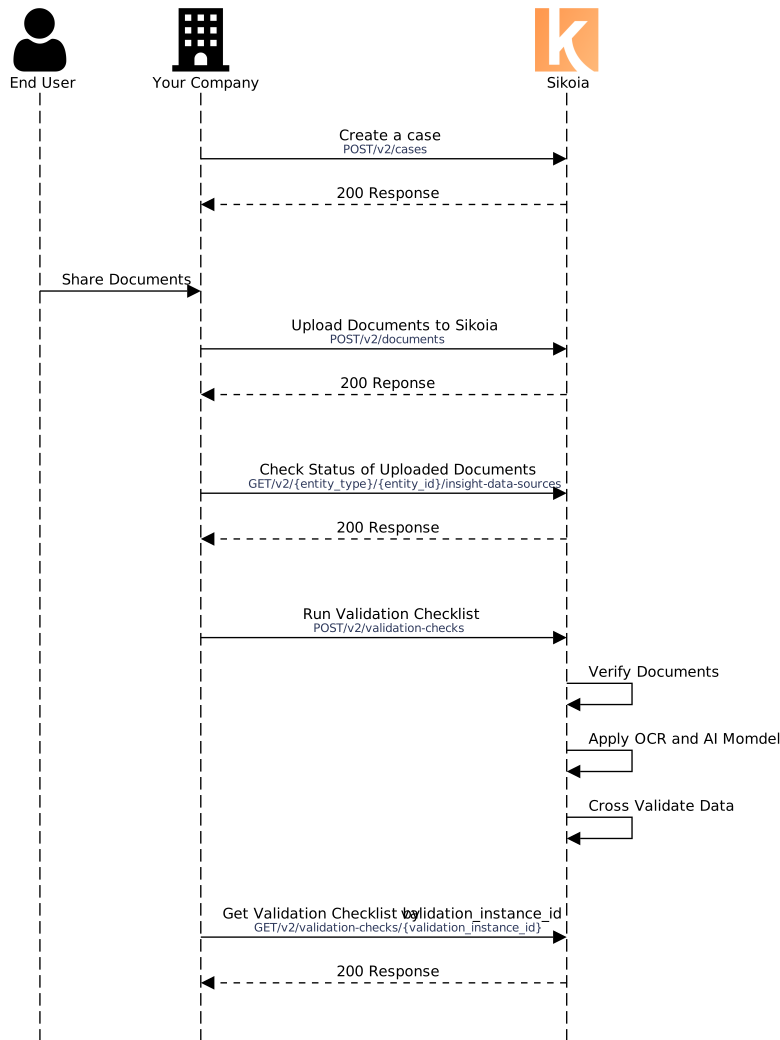
- Configure a completeness check (i.e. define the rules that reflect your policy).
- Create a case (e.g. a loan application), and attach relevant data sources (e.g. payslips, bank statements, open banking connections) to that case.
- Run the completeness check against the case, a person, or specific data sources/documents.
- Retrieve results: you receive the overall status (
Complete,Failed, orPending) plus detailed results for each rule — giving full transparency into what passed, what failed, and why.
See the image below for additional details.
Example Checks
You can find examples of commonly used checks here.
We understand that your rules may be unique. The Sikoia team can help to configure unique checks that include the specific rules that you want to run based on your company's requirements.
Recipe & Endpoints
Explore our Completeness Checks recipe to get started and be one of the earliest adopters.
Start exploring Sikoia's Income & Employer Verification endpoints here .
More Information
Have questions or want to discuss our solution with a specialist? Have specific categories or indicators you'd like to see added to the lists above? Contact us and we'll be happy to assist.
Updated 4 months ago